
An empathy statement is a short sentence that shows a customer you understand what went wrong for them and why it matters. In plugin and theme support, the good ones name the customer's actual problem, such as lost orders or a blank checkout, instead of their feelings.
Search "empathy statements" and you get long lists for call centers: late parcels, double charges, a caller who needs calming down.
Those lists are written for phone calls. Plugin support is written, technical and often public, so the same lines read differently in a ticket.
This guide is for the team that answers WordPress plugin tickets every day.
What is an empathy statement?
It is one sentence, usually near the start of a reply, that tells the customer you see their situation from where they sit. It comes before the fix, not instead of it.
A good empathy statement does three jobs:
- It names the problem. "Your order form stopped sending after the 3.4.2 update."
- It names why it matters. "That means orders are not reaching you."
- It leads to a next step. "Here is what we found, and what to do today."
If a sentence could be pasted into any ticket for any product, it is not really an empathy statement. It is filler.
Empathy statements vs sympathy statements
Sympathy says you feel bad for the customer. Empathy says you understand their position and are acting on it.
- Sympathy: "I'm so sorry to hear that."
- Empathy: "A form that fails silently is the worst kind, because you only find out when a customer calls."
Both have a place. An apology is right when the bug is yours, but it is not a substitute for showing you understood the problem.
Why "I understand your frustration" falls flat
Every list online includes it, and customers have read it a thousand times. In writing, it often reads as a script, because there is no tone of voice to carry it.
It also says nothing about the ticket. A customer whose shop lost three days of entries does not want their feelings described back to them.
They want proof that you read their message. Specific details are that proof: the version, the page, the thing that broke.
How to write an empathy statement for a support ticket
Use this order, and keep it to one or two sentences:
- Restate the problem in their words. Use the page, form or feature they named.
- Say what it costs them. Orders, sign-ups, a client deadline, a site that looks broken.
- Own your part, if there is one. "This is a bug in 3.4.2" is more reassuring than any apology.
- Move to the next step. The workaround, the fix, or the one question you need answered.
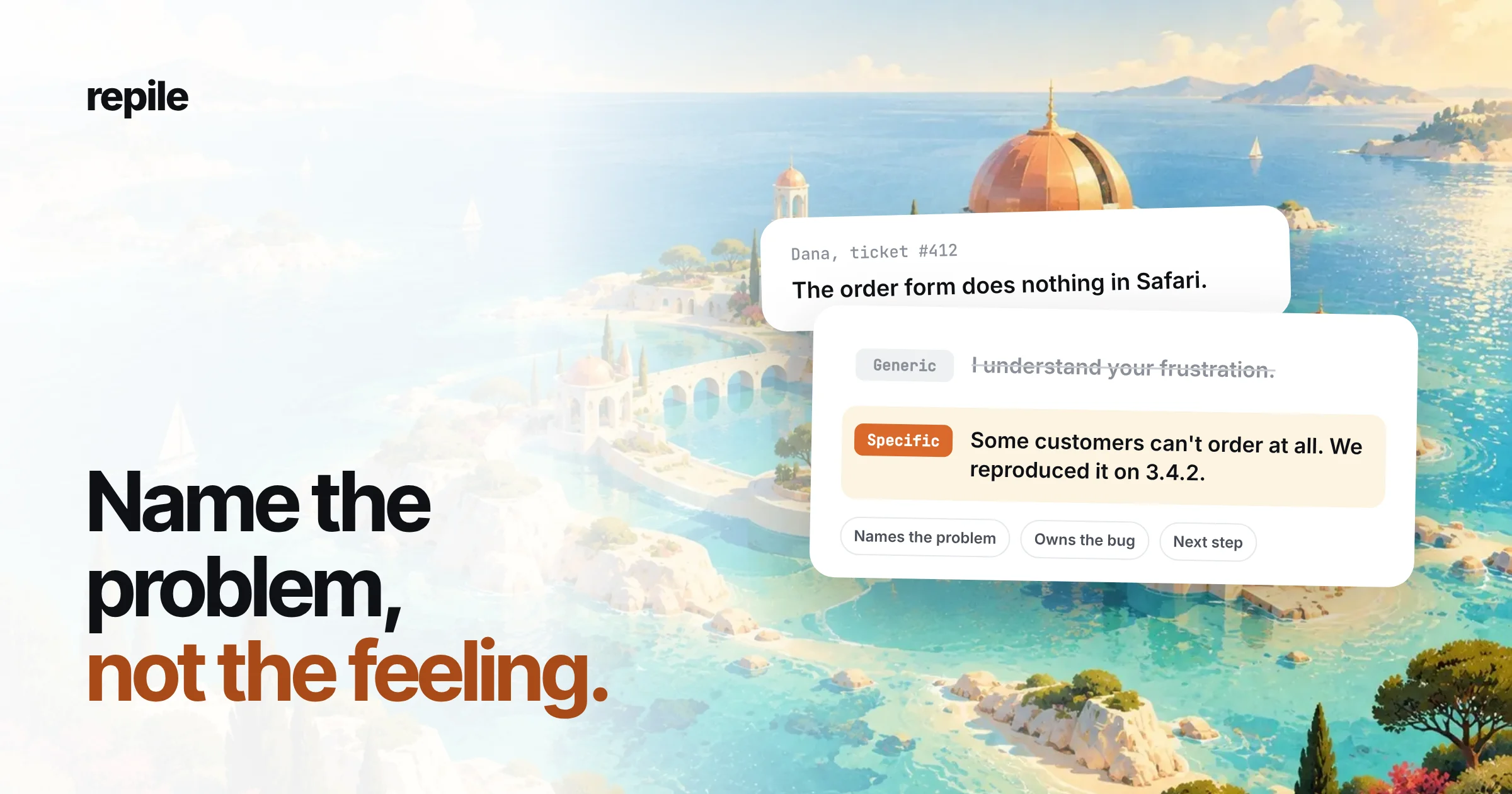
Here is the difference on a real-looking ticket. Dana Whitfield at Northwind Bakery wrote ticket #412: the order form in Formwise 3.4.2 does nothing in Safari.
Generic:
I understand your frustration and I'm sorry for any inconvenience.

Specific:
An order form that does nothing in Safari means some of your
customers can't order at all, so we treated this one first.
We reproduced it on Formwise 3.4.2, and it is our bug.
The second version is longer by one line. It also answers the question Dana was really asking: "Do you believe me, and are you on it?"
Empathy statements for plugin and theme tickets
These are grouped by the situations plugin teams see most. Adjust the details, and never send one without the specifics filled in.
When an update broke their site
- "Updating should never take your site down, and this one did. Here is how to get it back right now."
- "You updated because we asked you to, so this one is on us."
- "A white screen on a live shop is an emergency. Let's get you back first and find the cause second."
When data or orders were lost
- "Missing entries are the part that matters most here, so let's start there."
- "Three days of orders is serious. Here is what we can recover and what we cannot."
- "You should not have to find out from a customer that the form was down."
When the cause is another plugin or the theme
- "It is not your setup's fault, and it is not obvious from the outside. Your theme loads an older copy of a script our form needs."
- "We know you just want it working, not a lesson in plugin conflicts. Here is the shortest fix."
- "We can't change the other plugin, but we can tell you exactly what to send their team."
When they have waited too long
- "You wrote to us on Monday and this is our first real answer. That is too long."
- "Sorry for the wait. We used it to reproduce the problem, so this reply has an answer, not more questions."
When you need more information
- "We want to fix this without guessing, so one thing would help."
- "We know you have already described this once. The Site Health info will tell us what the description can't."
- "Thanks for the steps. They got us most of the way."
When the answer is no
- "We know this is not the answer you hoped for. Formwise cannot do this today, but here is what comes closest."
- "That makes sense for a bakery with weekend pickup. We have logged it as a feature request with your example."
- "This is a Pro feature, and we understand that is frustrating to find out midway through setup."
When they ask for a refund
- "If Formwise does not do what you need, you should not pay for it. We have started the refund."
- "Before we refund, can we try one thing? If it does not help, the refund goes through today either way."
When they are angry
- "You have every reason to be annoyed. Here is what we are doing about it."
- "You are right that the changelog should have mentioned this."
- "Thanks for staying with us through three replies. Here is the fix."
When the reply is public on the WordPress.org forum
- "Thanks for posting this. Other people on 3.4.2 will find this topic, so here is the full workaround."
- "We have seen a few reports like this since the update, and we are glad you included the steps."
Phrases to avoid in plugin support
Some lines are meant kindly but read badly in a ticket:
- "I understand your frustration." It describes the customer instead of the problem.
- "Sorry for any inconvenience." "Any" makes it sound like you do not know what happened.
- "Unfortunately, that is not a bug." Even when it is true, lead with what they can do instead.
- "As per our documentation." It tells them they should have read it. Link the page and quote the line.
- "Calm down" or "Please be patient." Nobody has ever become calmer after reading this.
- "We are aware of the issue" with nothing after it. Say what you know, and what happens next.
Where the empathy goes in a written reply
Put it in the first sentence, and say it once. A reply that apologises three times starts to sound unsure.
After that, the rest of the reply carries it: a clear cause, a workaround they can use today, and an honest date or no date. Our support ticket response examples show the full replies this opening leads into.
Keep empathy out of the internal note. The note is for the next person on your team, and it should be facts.
For replies you send often, write the empathy line into the saved reply with a gap for the specific detail. Our canned response examples mark those gaps so they never go out empty.
Can empathy statements be templated?
The structure can. The words should not.
A template line such as "[WHAT BROKE] means [WHAT IT COSTS THEM]" works, because someone has to fill it with the ticket's details. A template line such as "I understand your frustration" does not, because it is the same in every ticket.
A useful test: read your opening line and ask whether it would make sense in a ticket about a different plugin. If it would, rewrite it.
Where Repile fits
Repile does not decide how your team sounds, you do.
During setup, you pick one of three writing styles, and Repile saves it into your Everyone instructions, where you can edit it.
You can add rules there, or in a project's instructions, such as "Name the customer's problem in the first sentence" or "Never write: I understand your frustration."
Repile reads those instructions on every ticket. After it reads your plugin's code to find the cause, it leaves an internal note and a reply draft in FreeScout or Help Scout.
Because the draft starts from what Repile found, the opening line can name the real problem instead of a generic one. A person on your team still reads the draft, adjusts the tone, and presses send.
See how it fits a plugin company or a theme company, or compare the plans.