
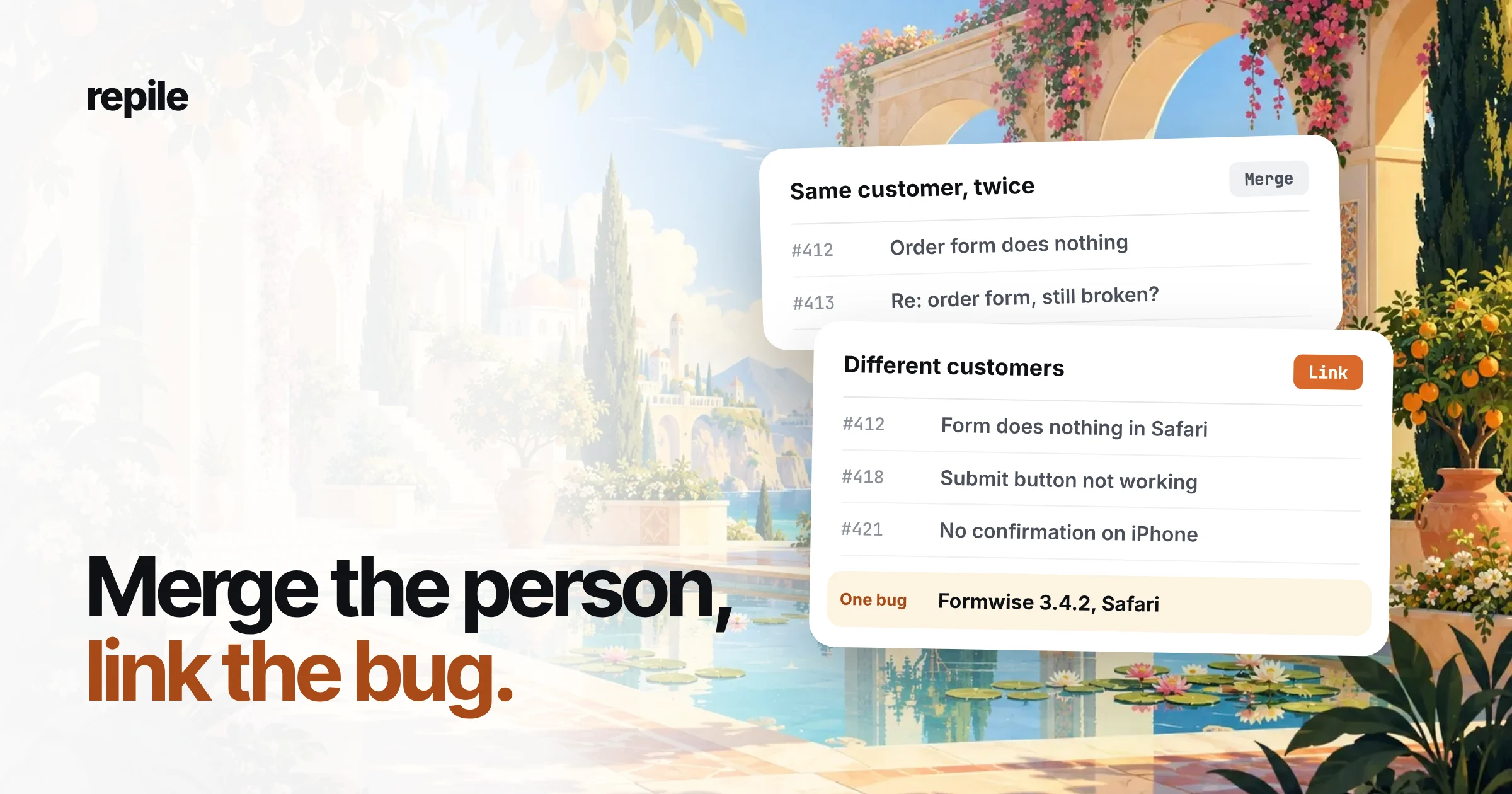
A duplicate ticket is a second ticket about a problem your team already has open. For a WordPress plugin or theme team there are two kinds, and they need opposite handling: merge when one customer wrote twice, and link when different customers hit the same bug.
Search "duplicate tickets" and most of what comes back is helpdesk documentation about the merge button, or vendor posts about detecting duplicates with AI.
They treat every duplicate as clutter to clean up. On a plugin team, the most common duplicate is not clutter at all: it is the fifth customer telling you a release broke something.
What is a duplicate ticket?
A duplicate ticket asks about the same problem as a ticket that is already open. It might come from the same person or from someone else.
The word hides two different situations:
- The same customer, twice. Dana Whitfield at Northwind Bakery opens ticket #412, then sends a follow-up from her phone that lands as a new ticket. That is one conversation split in two.
- Different customers, one cause. Three sites update to Formwise 3.4.2 and three people write in because the order form does nothing in Safari. That is three conversations about one bug.
The first is a duplicate in every sense. The second is three real customers who each need an answer.
Why do duplicate tickets happen?
Same-customer duplicates usually come from how people write in. These are the common causes:
- No acknowledgement. The customer gets no reply, is not sure the first message arrived, and sends another.
- A different address or channel. A reply from a second email address, or the same question on your WordPress.org forum and in your helpdesk.
- A changed subject line. Some email clients start a new thread when the subject changes.
- A long wait. A customer who hears nothing for two days often writes again rather than replying.
Many-customer duplicates have one cause: a bug that many sites meet at once. Plugin bugs arrive in waves after a release, because sites update over a few days.
Should you merge duplicate tickets?
Merge only when the tickets come from the same customer about the same problem. Then the whole history sits in one place, and nobody answers the same person twice.
Do not merge tickets from different customers, even when the symptom is identical. Link them to one shared record instead, and answer each person in their own ticket.
Merging different customers causes real problems:
- People get replies meant for someone else. One thread now has two sites, two versions and two sets of details.
- You lose the count. Three tickets become one, so the bug looks rarer than it is.
- Merges are hard to undo. Help Scout's own docs say there is no way to revert a conversation merge, and that conversations can only be merged within one customer profile.
That last rule exists for a reason. A helpdesk treats a conversation as belonging to one person.
How to merge a same-customer duplicate
Keep the oldest ticket as the main one, because it usually has the first message and any work already done. Merge the newer one into it.
Before you merge, check three things:
- It really is the same problem. A customer who writes twice may be asking about two different bugs.
- Nothing new is in the second ticket. A follow-up often carries the one detail you needed, such as a plugin version or a screenshot.
- Nobody else replied to it. If a teammate already answered the duplicate, read that first so you do not contradict them.
Then reply once, in the main ticket. Mention that you have seen both messages, so the customer does not wait for a second answer.
In Help Scout, merging happens from the Conversations card in the ticket sidebar, one conversation at a time. Other helpdesks differ, so check yours before you rely on it.
How to handle many customers reporting the same bug
Treat it as one bug with many tickets. The goal is one investigation, one record, and a reply to every person.
- Confirm it once. One person reproduces the bug and writes down the versions, the browser and what the customer sees.
- Make one record. Open a GitHub issue, or whatever your developers track bugs in, and link every matching ticket to it.
- Tag the tickets. A tag such as "safari-3-4-2" lets anyone on the team find every affected ticket in seconds.
- Reply to each customer. Confirm the bug, give the workaround, and say what happens next. A saved reply helps here, as long as you fill in their details.
- Close the loop when the fix ships. Everyone with the tag gets a short note that 3.4.3 is out.
If the bug keeps arriving, add it to your known issues list. Some customers will read it and never write in.
Example: three tickets, one bug
Here is how a wave might look after a release. The ticket numbers other than #412 are examples.
#412  Dana Whitfield, Northwind Bakery
      "Order form does nothing in Safari"
#413  Dana Whitfield, Northwind Bakery (from her phone)
      "Re: order form, still broken?"
#418  Another customer
      "Submit button not working"
#421  Another customer
      "No confirmation email on iPhone"
Merge #413 into #412, because it is the same person about the same problem. Link #412, #418 and #421 to one bug record, because they are three customers with one cause.
Notice that #421 does not say Safari. The iPhone detail is the clue, and someone has to check it before tagging it.
How do you spot a duplicate before you answer?
Read the version and the symptom, not the subject line. Customers describe the same bug in very different words.
Look for these signals:
- The same plugin version, especially the one you released this week.
- The same environment, such as one browser, one PHP version or one popular theme.
- The same missing behavior, such as no error and no saved entry.
- The same customer email or site URL across two tickets.
A similar symptom on a different version is often a different bug. Check before you link, or you will send a workaround that does not apply.
This check belongs in ticket triage, the first pass over every new ticket. Deciding "duplicate of what" is part of sorting the queue, not something to work out halfway through a reply.
How to stop duplicate tickets
You cannot stop the many-customer kind except by fixing the bug. You can make each wave shorter, and you can prevent most same-customer duplicates.
- Send an automatic acknowledgement with the ticket number, so customers know the message arrived.
- Ask customers to reply, not write a new email, in that acknowledgement.
- Publish a known issue as soon as a release bug is confirmed, and link it from your support form.
- Pin a topic on your WordPress.org forum for the same bug, so free users find it there.
- Give a realistic reply time in the auto-reply, so people do not write again after a day.
Duplicates also skew your numbers. A wave of quick "yes, we know" replies can make your first response time look better than it is.
Where Repile fits
Repile is not a helpdesk, so it does not merge tickets or change their status. Merging stays in Help Scout or FreeScout, and Repile mirrors the status your helpdesk sets.
It helps with the judgement before that. When Repile triages a new ticket, it decides whether it is a real bug, a setup question or a duplicate, and what it needs to check before anyone answers.
Each Repile project has instructions for one product. The Projects docs suggest putting known issues there, so a new ticket can be matched against a bug you already confirmed.
Repile then leaves an internal note and a reply draft in the ticket. A person on your team reads the draft and presses send.
When the cause is in your code, Repile opens a GitHub issue with the steps, the evidence and the failing line, linked back to the ticket. That gives the later tickets in a wave one record to link to.
Each project also has a Director that knows every ticket in the project. Your team can ask it about the project in chat or Slack.
See how it fits a plugin company, or compare the plans.